Blaze Studio: Business Finance3.12.35
Publisher Description


Blaze Studio: Finance Unplugged is a finance innovation studio for entrepreneurs. Whether you're launching your first business or strengthening your financial leadership as a seasoned founder, we give you the tools and education to lead with confidence.
Subscribe to Blaze Pro to access:
-- Self-paced audio courses covering dozens of finance topics
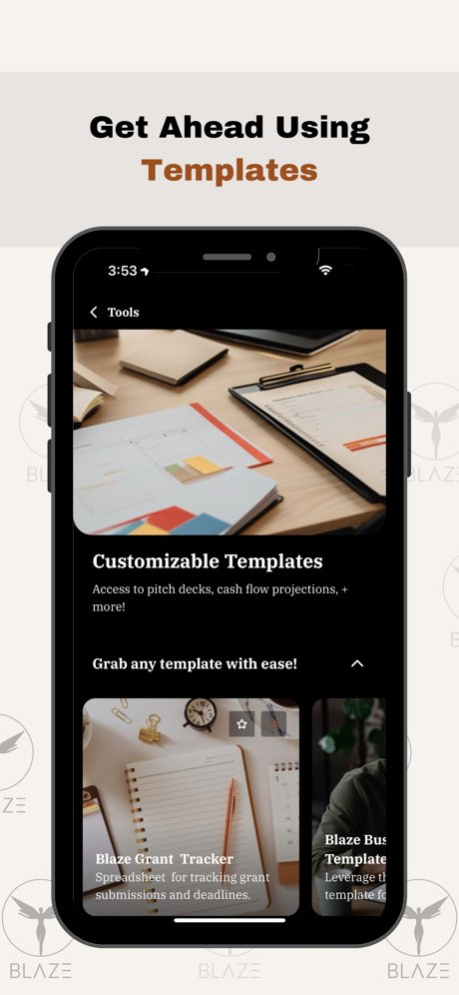
-- Pre-built templates for budgeting, fundraising, and forecasting
HOW IT WORKS
Subscribe directly in the app.
APP USAGE & SUBSCRIPTION
Blaze Group is free to download. Full access to the learning library requires a monthly subscription. When you choose to subscribe, you will be charged the price shown in the app. Subscriptions automatically renew unless canceled at least 24 hours before the end of the current period. Your account will be charged within 24 hours prior to renewal. The current subscription period cannot be canceled. You can manage or cancel your subscription at any time in your settings.
INFORMATION ABOUT THE APP AND PURCHASE OPTIONS
By signing up, you will get access to subscription(s) that include features such as progress tracking, and offline sync.
The download of Blaze Studio: Business Finance is free of charge. No free trial offered. Should you use Blaze Studio: Business Finance app to access in-app content via available subscription(s), a payment will be charged to your credit card through your App Store account . A subscription renews automatically unless canceled at least 24 hours prior to the end of the subscription period. There is no increase in price when renewing.
Subscription(s) can be managed and auto-renewal turned off in Account Settings in the App Store after purchase.
Read our full Terms of Service and our Privacy Policy:
https://passion.io/terms-of-service
https://passion.io/privacy-policy
Version History Bugfixes and Improvements 3.12.35 Apr 7 Bugfixes 3.12.34 09/03/2025 Bugfixes and Improvements 3.11.33 06/30/2025 Enhancements that make your learning experience even more enjoyable. 3.11.32 04/30/2025 Enhancements that make your learning experience even more enjoyable! 3.11.31 02/08/2025 Bugfixes 3.11.30 01/07/2025 Bugfixes and Improvements 3.11.29 11/18/2024 Bugfixes and Improvements 3.11.27 09/27/2024 Bugfixes 3.10.25 03/22/2024 Bugfixes 3.9.24 01/22/2024 Bugfixes 3.9.23 01/21/2024 Bugfixes 3.9.22 09/20/2023 Bugfixes 3.9.21 09/13/2023 Bugfixes 3.8.19 08/05/2023 Bugfixes 3.7.18 07/20/2023 Bugfixes 3.7.17 07/17/2023 Bugfixes 3.7.16 06/24/2023 Bugfixes 3.7.15 06/18/2023 Bugfixes 3.7.14 05/10/2023 Bugfixes 3.6.11 03/24/2023 Bugfixes 3.6.9 02/13/2023 Bugfixes 3.6.8 11/17/2022 Improvements and bug fixes. 3.5.6 09/14/2022 Bugfixes 3.4.5 07/28/2022 Enhancements and Bugfixes 3.3.4 06/14/2022
About Blaze Studio: Business Finance
The company that develops Blaze Studio: Business Finance is BLAZE GROUP LLC. The latest version released by its developer is 3.12.35.
To install Blaze Studio: Business Finance on your iOS device, just click the green Continue To App button above to start the installation process. The app is listed on our website since 2026-10-13 and was downloaded 5 times. We have already checked if the download link is safe, however for your own protection we recommend that you scan the downloaded app with your antivirus. Your antivirus may detect the Blaze Studio: Business Finance as malware if the download link is broken.
How to install Blaze Studio: Business Finance on your iOS device:
- Click on the Continue To App button on our website. This will redirect you to the App Store.
- Once the Blaze Studio: Business Finance is shown in the iTunes listing of your iOS device, you can start its download and installation. Tap on the GET button to the right of the app to start downloading it.
- If you are not logged-in the iOS appstore app, you'll be prompted for your your Apple ID and/or password.
- After Blaze Studio: Business Finance is downloaded, you'll see an INSTALL button to the right. Tap on it to start the actual installation of the iOS app.
- Once installation is finished you can tap on the OPEN button to start it. Its icon will also be added to your device home screen.
Program Details
System requirements
Download information
Pricing
Version History
version 3.12.35
posted on 2026-10-13
Version History Bugfixes and Improvements 3.12.35 Apr 7 Bugfixes 3.12.34 09/03/2025 Bugfixes and Improvements 3.11.33 06/30/2025 Enhancements that make your learning experience even more enjoyable. 3.11.32 04/30/2025 Enhancements that make your learning experience even more enjoyable! 3.11.31 02/08/2025 Bugfixes 3.11.30 01/07/2025 Bugfixes and Improvements 3.11.29 11/18/2024 Bugfixes and Improvements 3.11.27 09/27/2024 Bugfixes 3.10.25 03/22/2024 Bugfixes 3.9.24 01/22/2024 Bugfixes 3.9.23 01/21/2024 Bugfixes 3.9.22 09/20/2023 Bugfixes 3.9.21 09/13/2023 Bugfixes 3.8.19 08/05/2023 Bugfixes 3.7.18 07/20/2023 Bugfixes 3.7.17 07/17/2023 Bugfixes 3.7.16 06/24/2023 Bugfixes 3.7.15 06/18/2023 Bugfixes 3.7.14 05/10/2023 Bugfixes 3.6.11 03/24/2023 Bugfixes 3.6.9 02/13/2023 Bugfixes 3.6.8 11/17/2022 Improvements and bug fixes. 3.5.6 09/14/2022 Bugfixes 3.4.5 07/28/2022 Enhancements and Bugfixes 3.3.4 06/14/2022
version 3.12.34
posted on 2025-09-03
Bugfixes
version 3.12.34
posted on 2025-09-03
Sep 3, 2025
Version 3.12.34
Bugfixes
version 3.11.33
posted on 2025-06-30
Jun 30, 2025
Version 3.11.33
Bugfixes and Improvements
version 3.11.32
posted on 2025-04-30
Apr 30, 2025
Version 3.11.32
Enhancements that make your learning experience even more enjoyable.
version 3.11.31
posted on 2025-02-08
Feb 8, 2025
Version 3.11.31
Enhancements that make your learning experience even more enjoyable!
version 3.11.30
posted on 2025-01-07
Jan 7, 2025
Version 3.11.30
Bugfixes
version 3.11.29
posted on 2024-11-18
Nov 18, 2024
Version 3.11.29
Bugfixes and Improvements
version 3.11.27
posted on 2024-09-27
Sep 27, 2024
Version 3.11.27
Bugfixes and Improvements
version 3.10.25
posted on 2024-03-22
Mar 22, 2024
Version 3.10.25
Bugfixes
